Reviews
Puzzle Block Fun delivers a satisfying puzzle experience with its straightforward mechanics and colorful design. The game is perfect for quick breaks or extended play, offering a relaxing pace without timers. The increasing difficulty keeps things engaging, while the family-friendly content ensures a safe environment for everyone. Its intuitive controls make it easy to pick up and play.
Description
Game Introduction
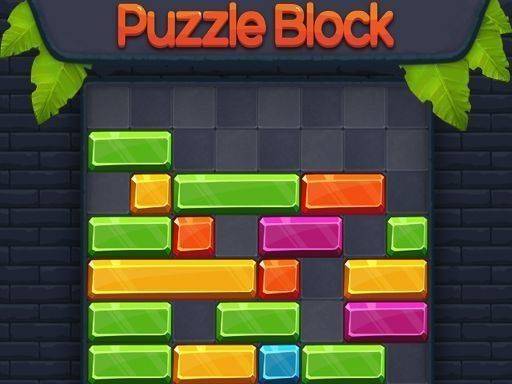
Puzzle Block Fun is a delightful and engaging puzzle game that challenges players to slide blocks left or right to create and clear full lines. With its straightforward mechanics and colorful design, it offers a relaxing yet stimulating experience for players of all ages. The game is perfect for quick breaks or extended play sessions, as each round presents a new puzzle to solve. As you progress, the pace increases, testing your reflexes and strategic thinking. Puzzle Block Fun is designed to be family-friendly, ensuring a safe and enjoyable environment for everyone. Whether you are a casual gamer or a puzzle enthusiast, this game provides endless entertainment without any violent or inappropriate content.
How to Play
To play Puzzle Block Fun, simply use your mouse or touch screen to slide the blocks left or right. Your goal is to arrange the falling blocks into complete horizontal lines. Once a line is fully filled, it disappears, making room for more blocks. The game ends when the blocks stack up to the top of the screen. Plan your moves carefully to maximize line clears and keep the play area manageable. There are no timers or pressure, so you can take your time to think. The controls are intuitive, making it easy for anyone to pick up and play. Enjoy the satisfying feeling of clearing lines and achieving high scores!
Game Features
Simple controls allow for easy gameplay using mouse or touch. Colorful graphics create an engaging visual experience. Endless challenges provide ongoing fun as the game increases in difficulty over time. Family-friendly content ensures a safe environment for players of all ages. The game offers a relaxing pace with no timers, allowing thoughtful play.
Tips for Success
Focus on creating full lines efficiently by planning where to place each block. Keep the play area as low as possible to avoid reaching the top. Try to clear multiple lines at once for higher scores. Practice regularly to improve your speed and strategic thinking. Take your time—there is no rush, so think before you slide.